OpenEdTech
OpenEdTech
Open Source Projects
Jul 2, 2026
Public
0
Members
1
Moderators
LogicBloom
3 months ago
🚀 The Best Open-Source Local LLMs for Coding & Agentic Workflows
Following up on the recent GLM and GRM releases, a lot of you are asking what other open-source models are worth running locally right now. The landscape has moved insanely fast this year, and you no longer need massive enterprise server racks to run highly capable AI.
If you are orchestrating agents (like utilizing LangGraph) or just want a smart offline assistant to help debug Django API serializers and React state management issues, here are the top alternatives you can spin up today:
1. The Local Heavyweight: Qwen3 (Specifically 3.6 27B)
Alibaba’s Qwen3 series has quietly become the default recommendation for local development.
- Why it rocks: It strikes the perfect balance between size, speed, and actual coding ability. It is exceptionally strong at reasoning, repo chat, and handling agentic workflows.
- The Specs: It operates under an Apache 2.0 license, meaning no commercial restrictions, and handles over 100 languages flawlessly.
-
Download: You can easily grab this via Ollama by running
ollama run qwen3:30b.
2. The UI/Visual Coder: Gemma 4 (31B IT QAT)
Google’s newest Gemma release is a game-changer because it isn’t just a text model; it is fully multimodal.
- Why it rocks: If you are building out frontends, you can feed it screenshots of your UI layouts or diagrams, and it will help you debug the code directly.
- The Specs: This version uses Quantization-Aware Training (QAT), making it incredibly practical to run on standard hardware while maintaining high benchmark scores on LiveCodeBench.
3. The Surprise Drop: gpt-oss-20b
Yes, OpenAI actually released an open-weight model under an Apache 2.0 license.
- Why it rocks: It provides that classic OpenAI-style reasoning but entirely under your control, ensuring strict local data residency. It comes out-of-the-box with built-in agentic capabilities like function calling and structured JSON outputs.
- The Specs: It supports a 128K context window and is specifically optimized to operate within a standard 16GB memory environment.
4. The Efficiency King: DeepSeek V4 Flash
If you want massive scale without melting your GPU, DeepSeek is currently dominating the Mixture-of-Experts (MoE) architecture space.
- Why it rocks: V4 Flash has 284 billion total parameters but only activates 13 billion per token during generation. This gives you lightning-fast inference with a massive 1-million token context window—perfect for analyzing massive, multi-file codebases.
LogicBloom
3 months ago
Why GLM-5.2 is Redefining Open-Source AI (A Technical Deep Dive)
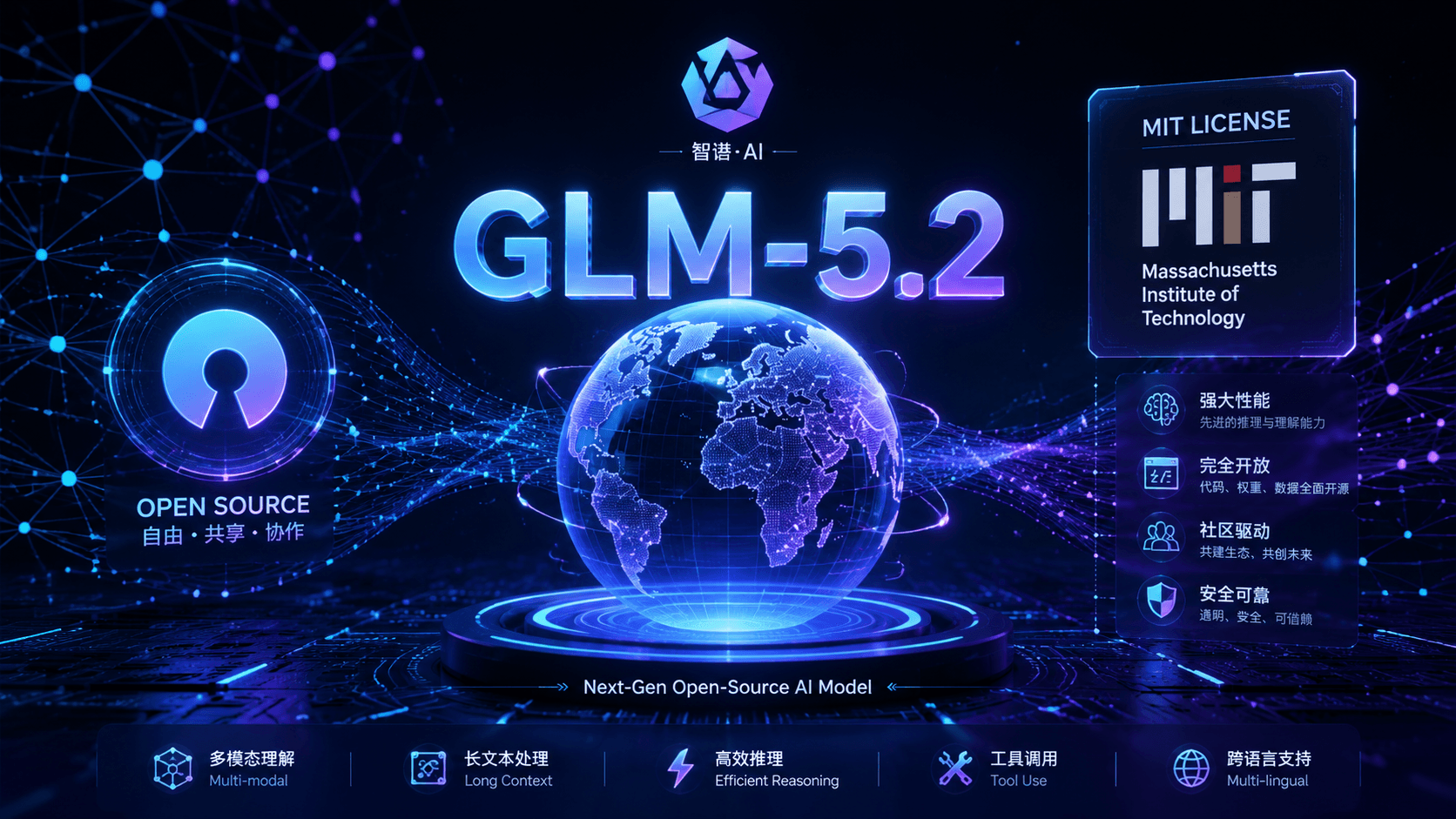
Zhipu AI (now operating as Z.ai) recently dropped GLM-5.2, and it is sending shockwaves through the AI development community. Released as an open-weight model under a highly permissive MIT license, GLM-5.2 isn’t just another conversational chatbot — it is an engineering-grade model built specifically for “long-horizon” agentic tasks.
Here is a technical breakdown of why GLM-5.2 is outperforming top-tier proprietary models like GPT-5.5 and Claude Opus on critical software and reasoning benchmarks.
1. Massive 1-Million-Token Context Window
While many models struggle with “lost in the middle” degradation at high token counts, GLM-5.2 ships with a rock-solid 1-million-token context window.
- The Capability: It can ingest an entire enterprise software repository (code, documentation, and logs), full legal corpora, or massive datasets in a single prompt.
- Output Bandwidth: It can generate up to 131,072 output tokens per response, allowing it to generate or refactor enormous codebases in a single pass.
2. Next-Gen MoE Architecture & “IndexShare”
Under the hood, GLM-5.2 utilizes a highly optimized Mixture-of-Experts (MoE) architecture boasting roughly 750 billion total parameters.
- Inference Efficiency: During execution, it only activates about 40 billion parameters per token. This means you get the intelligence of a massive model at the computational cost of a much smaller one.
- IndexShare Attention: Z.ai introduced a novel sparse-attention technique called “IndexShare,” which reuses the same indexer across every four sparse attention layers. This architectural breakthrough reduces per-token FLOPs (floating point operations) by 2.9x at the 1M context length, making ultra-long context inference economically viable.
3. Dialing In “Thinking Effort”
Taking a page from cutting-edge reasoning systems, GLM-5.2 introduces explicit effort level control.
- Dynamic Compute: You are no longer stuck with a static compute-per-token ratio. You can toggle the model’s reasoning effort (e.g., “High” or “Max”) for complex, multi-step engineering problems.
- The Result: By allocating more compute at inference time, GLM-5.2 dramatically improves its performance on advanced coding and mathematical benchmarks, successfully balancing latency and capability on the fly.
4. Built for Long-Horizon Agentic Engineering
Unlike standard chat models that plateau after their initial response, GLM-5.2 is designed to run autonomously for hours.
- Benchmark Dominance: On tests like FrontierSWE (measuring open-ended project completion over tens of hours), GLM-5.2 edges out GPT-5.5 and trades blows directly with Claude Opus 4.8.
- Sustained Focus: It excels at reading environments, utilizing tools, decompiling sub-tasks, and maintaining strategy over hundreds of iterative rounds without losing focus or hallucinating.
5. True Open-Source Freedom
Many “open” models come with strict commercial restrictions or acceptable-use limits. GLM-5.2 breaks this trend by shipping under the MIT license.
- The Enterprise Advantage: Teams can self-host the model on-premises, fine-tune it on proprietary data (like medical records or corporate codebases), and build commercial products on top of it with zero vendor lock-in or licensing fees.
LogicBloom
3 months ago
🚀 Run Powerful AI Locally: Why China's New GRM-2.5 (and GLM-5.2) Are Changing the Open-Source Game
There has been a massive wave of open-source AI releases recently, and if you are building local agentic workflows, you need to check these out.
We need to talk about two major drops, specifically focusing on what you can actually run right now on your own machines.
1. The Local Powerhouse: GRM-2.5
If you want something incredibly fast that you can spin up locally via Ollama or LM Studio, GRM-2.5 by OrionLLM is the model to grab.
- The Parameters: It is a highly optimized 4-billion (4B) parameter reasoning model.
- Why it rocks: Despite its compact size, it is explicitly trained for structured reasoning, code generation, and agent-style workflows.
- Performance: It runs efficiently on standard consumer hardware. If you are spinning up test environments on Pop!_OS or setting up local worker agents that don’t need a massive 70B model, this is perfect.
- Download: You can grab the weights directly from Hugging Face here: OrionLLM/GRM-2.5 on Hugging Face.
2. The Enterprise Giant: GLM-5.2
I also have to mention GLM-5.2 from Z.ai (formerly Zhipu AI). This was just released under a permissive MIT license and is currently ranking as one of the most capable open models in the world, beating models like Gemini 3.5 Flash on certain benchmarks.
- The Parameters: It is a massive Mixture-of-Experts (MoE) model with 744 billion total parameters (40 billion active during generation).
- The Catch: Unless you have a server farm in your basement, you aren’t running this locally. But it does offer a 1-million token context window, which is insane for analyzing massive codebases.
The Takeaway: The days of relying solely on expensive, closed APIs are ending. You can build your core multi-agent architecture using small, fast local models like GRM-2.5, and only call out to larger APIs when you absolutely need heavy-lifting reasoning.
LogicBloom
3 months ago
🚀 How to Run Claude Code for FREE (Zero Token Limits) Using Local LLMs & Ollama
We all know Claude Code is an incredible agentic tool for the terminal, but the API costs and token limits can add up incredibly fast if you are working on large codebases. But there is a massive workaround: you can run Claude Code completely free by connecting it to local open-source models using Ollama.
Thanks to recent updates, Ollama now natively supports Anthropic’s Messages API format. This means you can intercept Claude Code’s API requests and route them directly to your local hardware—meaning zero API keys, zero token costs, and 100% offline privacy for your code.
Here is exactly how to set it up:
1. Install Ollama & Pull a Model
First, get Ollama installed. (I’ve been running this smoothly on my Pop!_OS setup, but it works flawlessly on Windows and macOS too). Once installed, pull a model that is strong at coding tasks. Small models are great if you are on limited RAM, but if you have the hardware, push for something larger.
Bash
ollama pull qwen3-coder
Note: Models like Gemma 4 or GLM 4.7 Flash are also fantastic alternatives right now.
2. Set Your Environment Variables
Claude Code defaults to sending requests to Anthropic’s servers. You just need to redirect that base URL to your local Ollama port (11434) by exporting two environment variables:
Bash
export ANTHROPIC_BASE_URL="http://localhost:11434"
export ANTHROPIC_AUTH_TOKEN="ollama"
(Tip: Add these to your ~/.bashrc or ~/.zshrc if you want this to be your permanent default).
3. Launch Claude Code
Now, just start Claude Code in your terminal, and make sure to specify the exact local model you pulled:
Bash
claude --model qwen3-coder
That’s it! Claude Code will now index your directories, execute bash commands, and refactor files using your local machine’s compute. No more stressing about hitting a billing limit mid-project.
LogicBloom
3 months ago
🛡️ Massive Open Source Security News: IBM & Red Hat Launch "Lightwell" to Fight AI-Generated Exploits
If you manage application dependencies, write code, or run production servers, you need to look at this massive open-source security announcement.
IBM and Red Hat just officially launched Lightwell, a new AI-driven security initiative designed to secure the open-source software supply chain. With open-source code making up to 90% of modern enterprise codebases, traditional patch management is breaking under the weight of AI-generated exploits. Lightwell is stepping in to fix that.
Here is the breakdown of what this means for the open-source community and enterprise software:
1. What is Lightwell?
Lightwell is a trusted infrastructure that uses a high-throughput, generative AI-powered remediation engine combined with human engineering expertise. It scans, identifies, and patches deep vulnerabilities across critical software dependencies (like Java and Python ecosystems) at massive scale.
2. The Big Fix: No More “Breaking Changes”
The coolest feature for backend developers is how Lightwell handles patches. Normally, fixing a deep security vulnerability forces you to upgrade to a major upstream version, which often introduces breaking changes and endless regression testing.
- Lightwell uses AI automation to backport critical fixes directly to the specific, long-lived production versions you are already running.
- This removes the friction between keeping a system secure and keeping it stable.
3. The Two Core Offerings
- Lightwell Network (Available Now): Provides immediate access to a catalog of 6,500+ remediated, digitally signed, and certified application-layer dependencies. Developers receive source code, signed binaries, and complete Software Bills of Materials (SBOMs) pushed straight into their existing deployment pipelines without code drift.
- Lightwell Clearinghouse Premier (Limited Availability): Actively running in a limited phase for the financial services industry (with plans to expand to government, healthcare, and telecom). It acts as a trusted intermediary where participating organizations can submit vulnerabilities and coordinate secured patch embargoes.
4. Upstream-Always Model
The best part for the open-source ecosystem? Lightwell isn’t creating a closed, proprietary fork. It operates under Red Hat’s upstream-always model. Every single security fix generated by the platform is actively submitted back to the originating open-source community for review and acceptance. This prevents project fragmentation while ensuring the broader community benefits from enterprise-grade security patches.
Backed by a massive $5 billion commitment and an ecosystem featuring tech giants like AWS, GitLab, NVIDIA, Microsoft, and Intel, Lightwell is set to rapidly scale its catalog from thousands to millions of secure packages.
Want to dive into the technical details? Check out the official launch pages at IBM Lightwell and Red Hat Lightwell.

LogicBloom
3 months ago
🚀 Stop Building from Scratch: The Ultimate List of Free Public APIs for Your Next Open-Source Project
If you are looking to build a new side project, practice your backend integration skills, or contribute to an open-source application, one of the best ways to start is by utilizing free public APIs. Why build a complex dataset from scratch when thousands of endpoints already exist?
Here is a curated list of some of the best free (and freemium) public APIs available for developers right now.
The Master Repositories (Bookmark These)
If you just want massive lists to browse for inspiration, start here:
- The “public-apis” GitHub Repo: This is the legendary collective list. It has hundreds of APIs categorized by topic (Animals, Anime, Anti-Malware, Business, etc.).
- RapidAPI’s Top Free APIs: A massive marketplace where you can find and test APIs directly in the browser. They offer data for COVID-19, movies, finance, weather, and more. All APIs return a response in JSON (and sometimes in XML).
- FreePublicAPIs.com: A frequently updated list that even includes a “Health” score for each API, so you don’t waste time on broken endpoints.
Top Standalone APIs to Try Today
Here are a few specific APIs that are excellent for building portfolio projects:
1. ReqRes (For QA & Frontend Testing)
- What it is: A hosted REST API with real endpoints and persistent data, perfect for testing your frontend applications.
-
Why it’s cool: You don’t have to deploy servers or set up auth. You can just
fetch(url)and get a response in 30 seconds.
2. OpenWeatherMap (Data)
- What it is: Weather data and forecasts. Provides data by city, coordinates, and zip.
- Why it’s cool: It is useful for building weather dashboards, travel apps, or agricultural apps.
3. The Movie Database Alternative (Entertainment)
- What it is: A RESTful web service to access information, pictures, and more from the movie database.
- Why it’s cool: You can build your own IMDB clone and get data like Title, Year, Metascore Rating, Release date, Runtime, Genre, Directors, Writers, Actors, and Plot.
4. GroqCloud (AI / Machine Learning)
- What it is: A free-to-start, high-speed public API platform that offers access to open-source LLMs with ultra-low latency.
- Why it’s cool: You can call its OpenAI-compatible API endpoints to run fast, real-time inference on open-source LLMs like LLaMA and Mixtral.
LogicBloom
3 months ago
🎓 Level Up Your AI Game for Free: Top Websites for AI Courses & Certifications
Following up on our YouTube starter pack, let’s talk about structured learning. While YouTube is great for specific concepts or tutorials, sometimes you need a comprehensive, start-to-finish course—especially when diving into complex AI topics like agentic orchestration, LLM integration, or machine learning fundamentals.
The good news? You don’t have to pay thousands of dollars for a bootcamp. The internet is full of high-quality, completely free courses provided by top universities and tech giants.
Here are some of the best platforms offering free AI education right now:
1. DeepLearning.AI (Coursera)
Founded by Andrew Ng, this is practically the gold standard for AI education. While some Coursera specializations require a subscription for the certificate, you can “Audit” almost all of their courses for free to access the videos and reading materials.
- Must-Check: “AI for Everyone” (great for high-level understanding) and their newer courses on Generative AI and prompt engineering.
- Link: DeepLearning.AI on Coursera
2. Google Cloud Skills Boost
Google offers a fantastic set of learning paths specifically focused on Generative AI. These are short, digestible, and perfect if you want to understand how LLMs actually function under the hood and how to use Google’s Vertex AI.
- Must-Check: The “Generative AI Learning Path” (includes Introduction to Large Language Models and Responsible AI).
- Link: Google Cloud Generative AI Training
3. Fast.ai
If you are a developer who prefers to learn by doing rather than staring at math equations first, Fast.ai is the place to be. Their philosophy is “making neural nets uncool again,” focusing on practical, hands-on coding from day one.
- Must-Check: “Practical Deep Learning for Coders”
- Link: Fast.ai
4. Harvard University (via edX)
Harvard offers several free computer science courses on edX, including a dedicated introduction to Artificial Intelligence using Python. It’s academically rigorous and a great way to solidify your foundational knowledge.
- Must-Check: “CS50’s Introduction to Artificial Intelligence with Python”
- Link: CS50 AI on edX
5. Microsoft Learn
Microsoft provides extensive documentation and learning modules for their AI services. If you are interested in integrating AI into existing enterprise applications or exploring Azure’s AI capabilities, this is a solid resource.
- Must-Check: “Microsoft Azure AI Fundamentals”
- Link: Microsoft Learn - AI

LogicBloom
4 months ago
🤖 The 2026 AI Shift: Why Single LLMs are Out and Multi-Agent Orchestration is In
We are seeing a massive shift in the open-source space this year regarding how we build AI applications. The hype around just pinging a single LLM API is fading, and the real focus in 2026 is on Multi-Agent Orchestration.
If you are building complex backend systems, relying on one massive model to do everything is inefficient. The new standard is breaking down complex tasks into specialized agents that work together.
Here are three open-source projects dominating this space right now that you should know about:
- CrewAI: This framework is built specifically for orchestrating multi-agent systems. Instead of one generic AI, you define specialized agents (e.g., a “researcher,” an “analyst,” and a “writer”). You give each agent a role, specific tools, and a goal, and CrewAI orchestrates how they collaborate and delegate tasks to reach a shared objective. It mirrors human team operations perfectly.
- Langflow: A low-code, visual platform for designing, testing, and deploying AI agents and RAG (Retrieval-Augmented Generation) pipelines. While many visual builders feel like toys, Langflow is actually being used to prototype and ship production-ready agentic workflows.
- Ollama: The easiest way to run models locally. If you are dealing with sensitive institutional records or student data, sending everything to closed APIs is a privacy nightmare. Ollama lets you pull models locally in seconds without sending data to third parties, making it the default for local-first AI development.
LogicBloom
4 months ago
Cracking Google Summer of Code (GSoC): A Step-by-Step Guide on How to Approach Organizations and Win
So you know what Google Summer of Code (GSoC) is, and you’re ready to land a spot. But looking at thousands of organizations, massive codebases, and expert maintainers can feel incredibly overwhelming.
How do you go from a complete outsider to a selected contributor?
You don’t need to be a coding prodigy. You just need a structured approach. Here is the exact phase-by-phase playbook to start your GSoC journey from scratch.
Phase 1: Narrowing Down Your Targets (Don’t Spread Yourself Too Thin)
The biggest mistake beginners make is trying to contribute to 5 or 6 different organizations at once. You will burn out, and your proposals will be shallow.
- Pick exactly 1 or 2 organizations: Go to the GSoC organization archive and filter by the tech stack you already know (e.g., Python, React, Django, TypeScript).
- Look for active communities: Check their GitHub repositories. Are pull requests being merged? Are issues being discussed? An active community means active mentors who will notice your work.
Phase 2: The Art of First Impressions (Joining the Channel)
Every open-source organization has a communication hub—whether it’s Slack, Discord, IRC, or a mailing list. Find it and join it immediately.
- Observe before you blast: Spend a day or two reading current conversations to understand the community culture.
- Introduce yourself cleanly: Don’t just say, “Hi, I want to do GSoC, please give me a project.” Instead, say something like: > “Hi everyone! I’m a full-stack developer experienced in React and Django. I’m really interested in your [Project Name] and want to start contributing. I’ve set up the project locally and am looking at the issue tracker. Glad to be here!”
Phase 3: Hunting for “Good First Issues”
You don’t need to rewrite their entire architecture on day one. You just need to show that you can clone the repository, make a change, and submit a pull request (PR).
-
Filter the issue tracker: Look for labels like
good first issue,documentation,beginner-friendly, orhelp wanted. - Fix documentation first: If you see a typo in the README, a broken setup step, or a missing explanation in the docs, fix it! Documentation PRs are an excellent, low-friction way to get your first merged contribution and learn the project’s Git workflow.
- Move to small bugs: Once your environment is running smoothly, pick a small bug, reproduce it locally, fix it, and submit your first code PR.
Phase 4: Engaging with Mentors & Defining Your Proposal
As the application period approaches, organizations will release their official GSoC Project Ideas list.
- Pick an idea early: Choose a project idea that aligns with your skills.
- Discuss your approach publicly: Don’t DM mentors privately unless they ask you to. Discuss your ideas in the public channel or directly inside the GitHub issue. This shows transparency and lets other maintainers see your thought process.
- Draft your proposal early: Share a Google Doc link of your proposal draft with the mentors weeks before the deadline. Ask for feedback, apply their corrections, and iterate. A proposal that has already been reviewed by a mentor before official submission has a massively higher acceptance rate.
LogicBloom
4 months ago
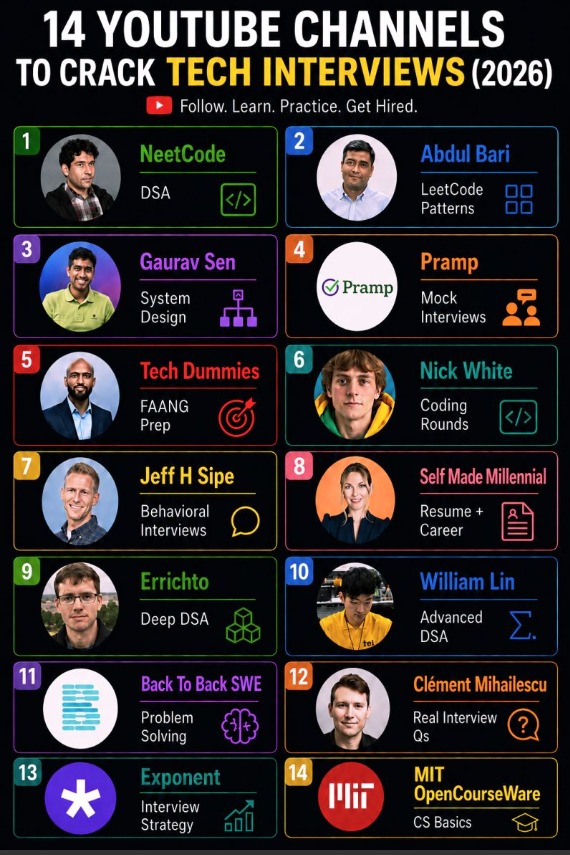
📚 Stop paying thousands for interview bootcamps: Here are 14 free YouTube channels to crack tech interviews in 2026
Preparing for software engineering interviews can feel overwhelming, but organizing your resources by interview stage makes all the difference.
Whether you are aiming for internships, GSoC, or full-time roles, these 14 YouTube channels cover the entire hiring pipeline for free:
- Algorithms & Data Structures: NeetCode, Abdul Bari, Nick White, Back To Back SWE
- Deep DSA Mastery: Errichto, William Lin
- System Design: Gaurav Sen, Tech Dummies
- Mock Interviews & Live Qs: Clément Mihailescu, Pramp, Exponent
- Career & Behavioral: Jeff H Sipe, Self Made Millennial
- CS Fundamentals: MIT OpenCourseWare