
P
VertexPulse
5 months ago
Interactive Learning Platform
Interactive learning is a hands-on pedagogical approach where passive listening is replaced by active engagement, real-time feedback, and collaborative problem-solving. Instead of just memorizing text from a screen or lecture, learners directly influence their educational journey through technology and practical application.
In a modern, tech-forward context, interactive learning is driven by four core elements:
Active Engagement: Learners participate through simulations, gamified challenges, and peer-to-peer discussions rather than just reading or watching.
AI-Driven Personalization: The system adapts in real time to the user’s pace, generating dynamic content and custom roadmaps based on strengths and weaknesses.
Instant Feedback Loops: Mistakes become learning moments immediately, with AI tutors or interactive tools explaining why an answer is right or wrong on the spot.
Practical Application: Education is focused on solving real-world scenarios, ensuring that theoretical knowledge is instantly translated into usable skills.

Chiluverichethankumar
5 months ago
Chapter 1: Create your first app
In this chapter, learn how to create a new Expo project.
Initialize a new Expo app
We’ll use create-expo-app to initialize a new Expo app. It is a command-line tool to create a new React Native project. Run the following command in your terminal:
> Terminal
> npx create-expo-app@latest StickerSmash
> cd StickerSmash
This command will create a new project directory named StickerSmash, using the default template. This template has essential boilerplate code and libraries needed to build our app, including Expo Router. We’ll continue to add more libraries throughout this tutorial as needed.
Benefits of using the default template
- Creates a new React Native project with expo package installed
- Includes recommended tools such as Expo CLI
- Includes a tab navigator from Expo Router to provide a basic navigation system
- Automatically configured to run a project on multiple platforms: Android, iOS, and web
- TypeScript configured by default
Run the app on mobile and web
In the project directory, run the following command to start the development server from the terminal:
Terminal
> npx expo start
After running the above command:
- The development server will start, and you’ll see a QR code inside the terminal window.
- Scan that QR code to open the app on the device. On Android, use the Expo Go > Scan QR code option. On iOS, use the default camera app.
- To run the web app, press w in the terminal. It will open the web app in the default web browser.
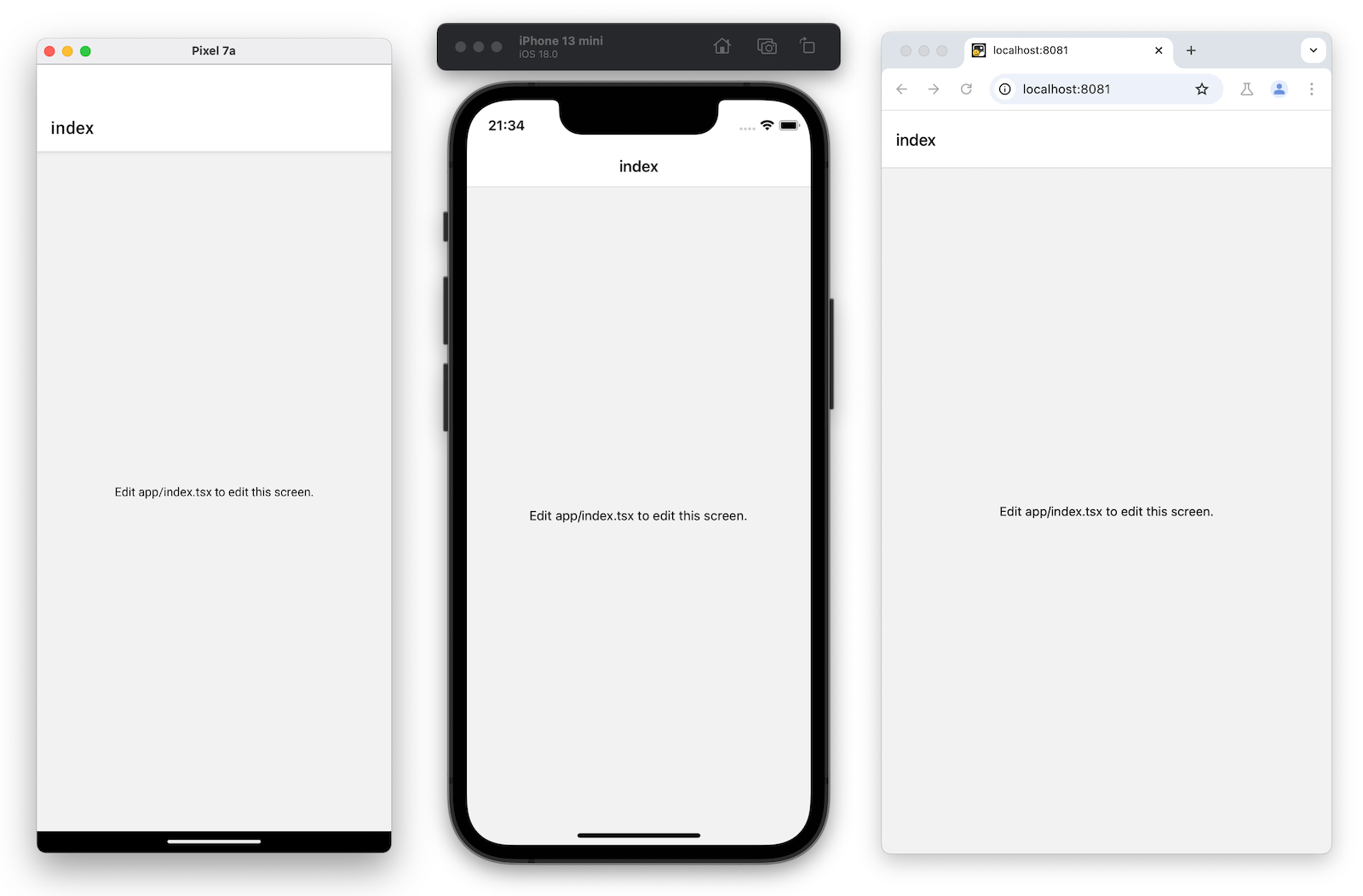
Once it is running on all platforms, the app should look like this:
Edit the index screen
The app/index.tsx file defines the text displayed on the app’s screen. It is the entry point of our app and executes when the development server starts. It uses core React Native components such as and to display background and text.
Styles applied to these components use JavaScript objects rather than CSS, which is used on web. However, a lot of the properties will look familiar if you’ve previously used CSS on web. Most React Native components accept a style prop that accepts a JavaScript object as its value. For more details, see Styling in React Native.
Let's modify app/index.tsx screen:-
Import StyleSheet from react-native and create a styles object to define our custom styles.
-
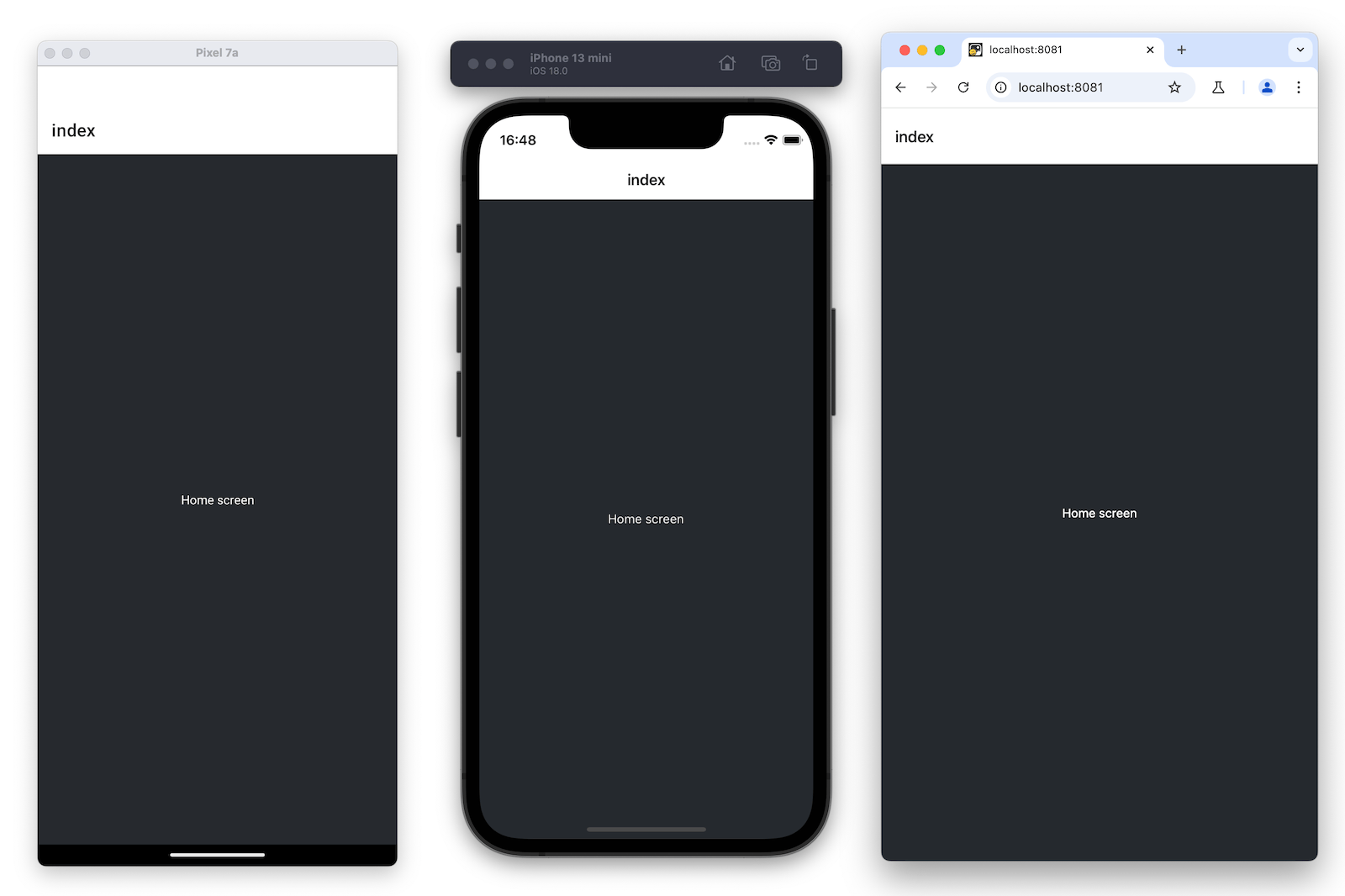
Add a styles.container.backgroundColor property to with the value of #25292e. This changes the background color.
-
Replace the default value of with “Home screen”.
-
Add a styles.text.color property to with the value of #fff (white) to change the text color.
imp
ort { Text, View, StyleSheet } from 'react-native'; export default function Index() { return ( Home screen ); } const styles = StyleSheet.create({ container: { flex: 1, backgroundColor: '#25292e', alignItems: 'center', justifyContent: 'center', }, text: { color: '#fff', }, });
> React Native uses the same color format as the web. It supports hex triplets (this is what #fff is), rgba, hsl, and named colors, such as red, green, blue, peru, and papayawhip. For more information, see Colors in React Native.
Summary
> > Chapter 1: Create your first app > > > > We’ve successfully created a new Expo project, used React Native core components, and are ready to develop our StickerSmash app. > > > > >
Chiluverichethankumar
4 months ago
Reactotron
Reactotron
- Reactotron is a popular, free desktop application developed by Infinite Red used for inspecting, debugging, and monitoring React JS and React Native applications.
- It works by plugging into your project as a development dependency, allowing you to track your app’s runtime behavior in real-time without bloating your production build.
Key Capabilities
- State Management: Real-time inspection and hot-swapping of your application state, particularly with Redux and MobX-State-Tree.
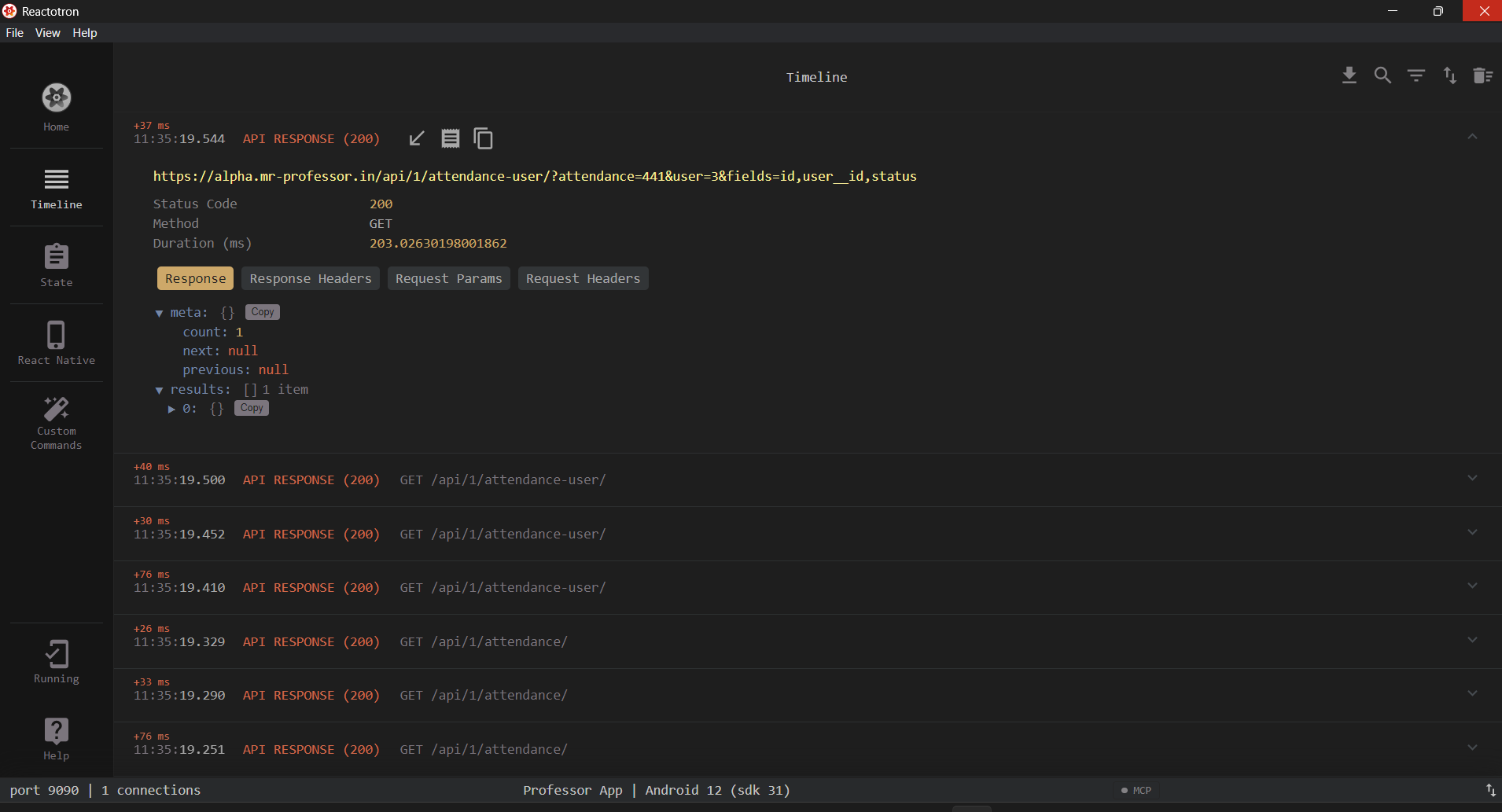
- Network Inspection: Monitors and displays all API requests and responses (e.g., using apisauce) as they happen.
- Enhanced Logging: Functions as a supercharged console.log with support for custom messages, filters, and global error tracking with source-mapped stack traces.
- Device-Specific Tools: Tracks local databases (AsyncStorage and MMKV), tests performance benchmarks, and lets you drop visual design mockups on top of your app (Image Overlays) for pixel-perfect UI alignment.
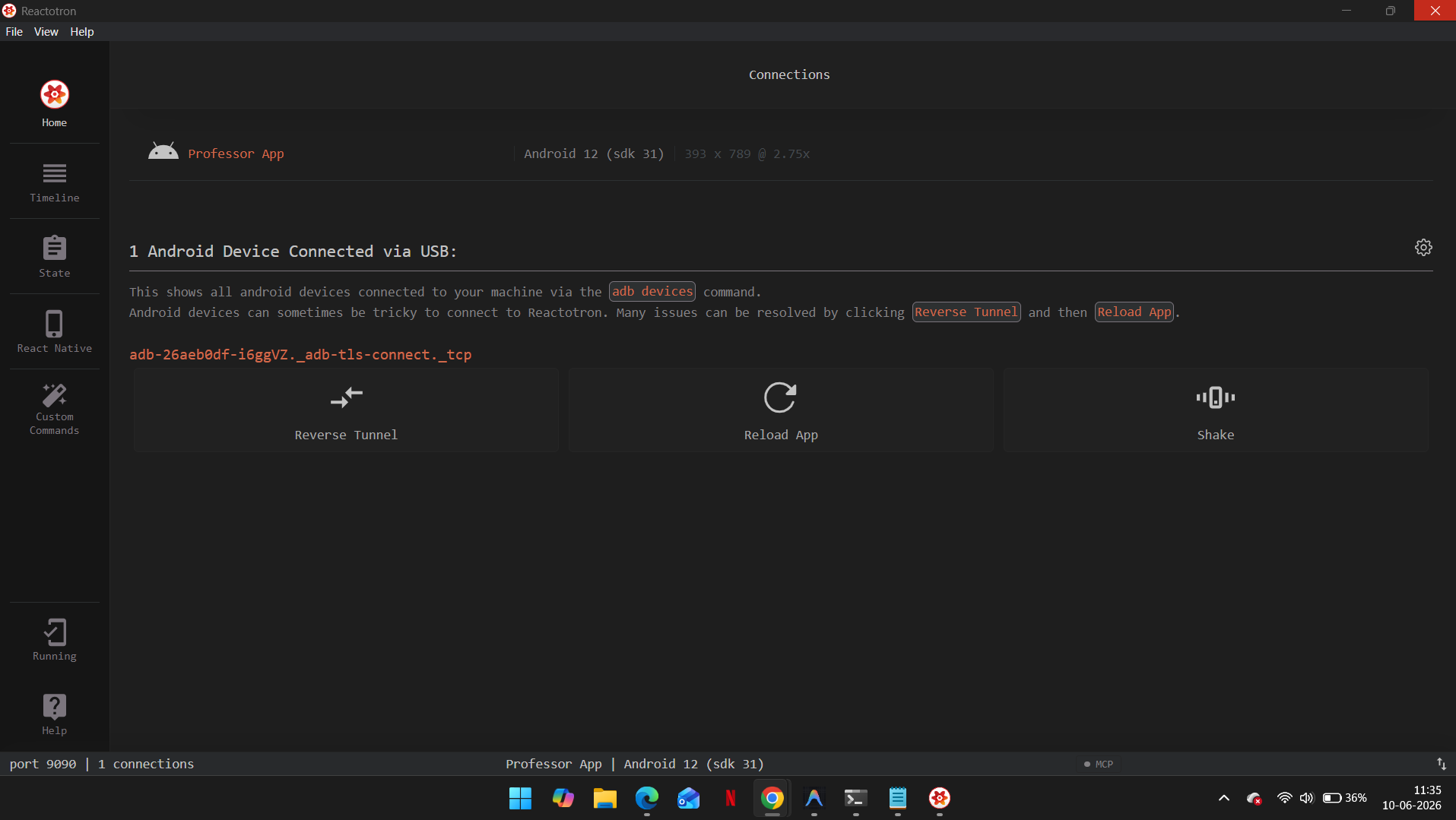
- Custom Commands: Allows you to define custom actions in your mobile app that can be triggered directly from the Reactotron desktop UI (e.g., force-navigating to a specific screen, or toggling user login states).
Why Developers Use It
Unlike traditional web-based debuggers (like Chrome DevTools), Reactotron operates natively within your app's actual runtime environment, preventing interruptions to your development workflow.For tips on getting set up and understanding the dashboard timelinefor more info Reactotron

Vishal Chiluveri
4 months ago
My Favorite Hans Zimmer Tracks – What Are Yours?
- Drive Fast (F1)
- F1 (F1)
- Elbows Out (F1) - Made this my Ringtone 😎
- Anything You Wish You’d Done Differently? (F1)
- Lining Up On The Grid (F1)
- Three Laps Is A Lifetime (F1)
- Dream is Collapsing (Inception)
- Mombasa (Inception)
- Time (Inception)
- Day One (Interstellar)
- Dream of Arrakis (Dune)
- Ripples in the Sand (Dune)
What are your favorite Hans Zimmer tracks? Any underrated gems I should listen to?
Comment your favorite Hans Zimmer tracks.
🌙
Vivekananda123
5 months ago
🌙 Welcome to the 3AM Club
🌙 Welcome to the 3AM Club
For the people still chasing dreams after midnight.
What’s something you’re working hard for right now even when nobody notices? 👇




Vivekananda123
4 months ago
🍬 Welcome to **Laddu Kavala Nayana** 🎉
🍬 Welcome to Laddu Kavala Nayana 🎉
The Sweetest Place for Crazy Deals & Offers! 💸🛍️
Welcome to Laddu Kavala Nayana, where every discount feels like getting an extra laddu! 🍬
Here, you’ll discover and share:
- 🔥 Best online & offline deals
- 💰 Huge discounts and price drops
- 🎁 Coupon codes & cashback offers
- ⚡ Flash sales and limited-time offers
- 🛒 Smart shopping tips and money-saving hacks
📢 Community Rule
If you find a great deal, don’t keep it to yourself—share it with everyone! Helping others save money makes the community stronger. ❤️
📌 Before Posting
- ✅ Mention the product or offer clearly.
- ✅ Include the price and discount (if available).
- ✅ Share the validity period or link if possible.
- ❌ No fake offers, spam, or misleading information.
🎯 Our Goal
Spend Less. Save More. Shop Smart.
Welcome to the family! 🍬💛



D
4 months ago
The future of work is changing.
Remote jobs, freelancing, digital services, online businesses, and skill-based opportunities are helping people earn income from anywhere in the world.
This community is dedicated to helping individuals:
✅ Discover legitimate work-from-home opportunities
✅ Learn high-demand digital skills
✅ Explore freelancing and remote careers
✅ Build multiple income streams online
✅ Stay updated with industry trends
✅ Avoid online scams and fake earning schemes
Whether you’re a student, job seeker, professional, homemaker, or entrepreneur, this community is designed to help you grow in the digital economy.
Join us and start building your future today.
B
NovaCircuit
5 months ago
Security
Always move your long term holdings to a hardware wallet exchanges are only for trading liquidity
B
NovaCircuit
5 months ago
Decentralization
No single entity (like a bank or government) controls the network. Power and data are distributed among all users.
Chiluverichethankumar
5 months ago
Welcome React Native Developers 🚀
Welcome to the React Native community!
This space is for: • Learning React Native • Building mobile apps • Sharing UI designs • Solving bugs together • Discussing Expo & Native CLI • AI integrations • Backend APIs • Firebase & Supabase • Performance optimization
Whether you are a beginner or advanced developer, feel free to: • Ask questions • Share projects • Post app screenshots • Discuss ideas • Help other developers
Let’s build amazing mobile apps together 🚀